Update: 5th December
A couple of weeks using Windows Vista, and the only thing annoying me is the mobile device support. About a week ago I did a clean install of vista. It's taken a couple of attempts to get the Money for the Pocket PC software running properly.
I had existing databases on the PocketPC device which weren't removed, and so I did a couple of reinstalls to try and ensure the software was on properly. I then managed to clean the database on the mobile device and get it working.
Of course, now it's working, I just can't work out when the device is synchronizing or not. Most of the time I have to hope that the data is being synchronized properly. The interface doesn't strike me as that intuitive - too much emphasis on the design and collapsible options, not enough on user functionality.
I'd like to see it made obvious when it is synchronizing, what is failing etc. I know the mobile device window shows it, but it just doesn't cut it with me. Hopefully by the time the Mobile Device Center software comes out of beta (this is beta 3), it'll be better and I'll be able to see just what Microsoft Money for the Pocket PC is doing.
Glyn
Tuesday, December 05, 2006
Wednesday, November 22, 2006
Starting with Vista
I installed the RTM version of Windows Vista a couple of days back (obtained through filing a number of bugs on the beta, just in case you're asking).
I did an upgrade installation, and have Money 2006 installed on my machine. After the installation, everything continued to work. However, Money 2006 is slightly odd around the edges, as can be seen below:
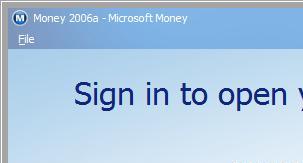
Instead of getting the glass edge to the window, I get a gray line. No problems for me though.
The next thing I ran into was how do I synchronize my Pocket PC with the system. The only reasons I ran into this were that my device wasn't detected, and when I did manage to get it detected, it wasn't that clear what to do. For the latter, I put a new article on the Money FAQ site at FAQ Article 447.
The former required me to download some beta drivers from the MS Downloads Site. These pre-release drivers should hopefully be replaced soon with some released ones, especially if people are going to start using Vista shortly.
And what do I think of Vista - well, the interface is very nice :-)
I did an upgrade installation, and have Money 2006 installed on my machine. After the installation, everything continued to work. However, Money 2006 is slightly odd around the edges, as can be seen below:
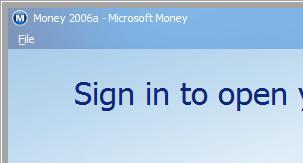
Instead of getting the glass edge to the window, I get a gray line. No problems for me though.
The next thing I ran into was how do I synchronize my Pocket PC with the system. The only reasons I ran into this were that my device wasn't detected, and when I did manage to get it detected, it wasn't that clear what to do. For the latter, I put a new article on the Money FAQ site at FAQ Article 447.
The former required me to download some beta drivers from the MS Downloads Site. These pre-release drivers should hopefully be replaced soon with some released ones, especially if people are going to start using Vista shortly.
And what do I think of Vista - well, the interface is very nice :-)
Monday, November 06, 2006
Money 2007 Service Pack 1
Microsoft have released Service Pack 1 for Microsoft Money 2007. You can find more details about this service pack at http://support.microsoft.com/kb/927811.
Included in this service pack are fixes to OFX version 2.03, some investment download information, errors with Mnyob99.dll and some crashes with Internet Explorer 7.
Microsoft Money should automatically download the update, which will have a version number of 1024 (if you look at the details through Help->About in the program).
Included in this service pack are fixes to OFX version 2.03, some investment download information, errors with Mnyob99.dll and some crashes with Internet Explorer 7.
Microsoft Money should automatically download the update, which will have a version number of 1024 (if you look at the details through Help->About in the program).
Friday, October 06, 2006
MVP status for another year
Having been away for a few days, I came back to the news that my MVP status continues into the 2006/2007 award year. I've now had the award from mid-summer 1998, so that's over 8 years.
Question: What is the Microsoft MVP award?
Answer: The Microsoft Most Valuable Professional (MVP) Award is an annual award that is given to outstanding members of Microsoft's peer-to-peer communities, and is based on the past year's contributions those members make in those communities online and offline.
You can find more details about the award on the Microsoft MVP site at http://mvp.support.microsoft.com.
In the United Kingdom, there are two of us for Microsoft Money - myself (Glyn Simpson) and Bob Peel. Both of us have the same length of award.
Question: What is the Microsoft MVP award?
Answer: The Microsoft Most Valuable Professional (MVP) Award is an annual award that is given to outstanding members of Microsoft's peer-to-peer communities, and is based on the past year's contributions those members make in those communities online and offline.
You can find more details about the award on the Microsoft MVP site at http://mvp.support.microsoft.com.
In the United Kingdom, there are two of us for Microsoft Money - myself (Glyn Simpson) and Bob Peel. Both of us have the same length of award.
Subscribe to:
Posts (Atom)